|
INTRO | TROY | ISAAC | EDDY | MAX | SOPHIE | #6 | RED & WHITE | CONTACT ME |

RED AND WHITE
You may have seen someone with a long white cane or stick that has red on it, a guide dog with a red and white reflective sleeve on its harness rather than the usual yellow one, or even a person wearing a red and white checkered Sam Browne belt. But you may not have realised that it’s there for a purpose. It’s giving a warning message, and a very important one at that!
Red and white are the internationally recognised colours for the deafblind. So, the message being given to drivers – and the public in general –is that the person using them has a dual sensory loss. This doesn’t necessarily mean the person is completely deaf and completely blind. The degree of loss varies from person to person. For example, we had a friend Jeanie who was completely deaf and had very little sight, and she had a guide dog named Trisha. On the other hand, there’s myself. I’m totally blind and have a partial hearing loss.
You may well be wondering: ‘How does someone who is totally deaf and blind communicate with others?’ Well, they use sign language, of which there are a few variations. I began to learn the deafblind alphabet not long after being registered partially deaf in the mid 1990’s. This involves signing what I want to say letter by letter, and then the reply is signed on my hand letter by letter. Although I don’t use it to a great extent, it has certainly come in very useful when I’ve been in a noisy environment. And of course there’s always the thought that, maybe in years to come, my hearing loss may get worse, and so I’m already prepared by having learned tactile signing.
Something else you may not know is that deafblind people use computers. Someone such as myself who has a partial hearing loss can often manage relatively well with free screen reader software which comes pre-installed on your device. These include:
Narrator for Windows | VoiceOver for Apple devices | TalkBack for Android devices
For those with partial sight and little or no hearing, there’s a wide range of very large monitors available for purchase. There are also free screen magnification programs that come pre-installed on your device, which include:
Magnifier for Windows | Zoom for Apple devices | Magnification for Android devices
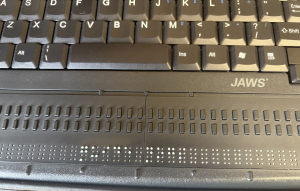
What about people who are completely deaf and completely blind? Do they also have the freedom to access computers and the Internet? Indeed they do! A wonderful piece of technology was first produced way back in 1975 which was named the “BRAILLEX,” and was developed by Papenmeier Reha in cooperation with Dr. Werner Boldt from Dortmund University in Germany. These incredible devices take the text seen on screen, and make it available to read by raising up rounded pins through the face of the display. In the photo (right), an electronic Braille device is connected to my PAC Mate Omni™, a portable notetaker, with the words “Guide Dogs” showing in the centre of the Braille display. As technology has continued to develop over the years, there are many companies producing these devices, and it’s now possible to link up Bluetooth Braille displays, not only to computers, but even to mobile phones and tablets!
It has to be said that, although I don’t like the idea, should the worst happen and my hearing continues to deteriorate, I do at least know that I’ll still be able to enjoy a level of independence, thanks to Guide Dogs for the Blind, tactile sign language, and the ever developing world of technology!
MORE INFORMATION
The Guide Dogs for the Blind Association works in partnership with Hearing Dogs for Deaf People to train and provide dual-purpose assistance dogs for people who are deafblind.
There are a number of charities in the UK who assist and support deafblind people and those who have a combined sight and hearing loss. These include:
Action Deafness | Deafblind UK | Sense
In the UK, electronic Braille displays and note takers can be purchased from a number of places, including:
Computer Room Services | HumanWare | RNIB SHOP | Sight and Sound Technology